



1 Description
This application note explains the process for interfacing and communicating with an MX200 Vacuum Controller from a Windows PC.
The recommended method is to use The Fredericks Company Online Serial Terminal. The Online Serial Terminal communicates directly with the MX200 through a supported web browser and allows MX200 serial commands to be sent without installing additional communications software.
USB communication is recommended when connecting the MX200 directly to a Windows PC.
Alternatively, you can use the Tera Term serial communications program. Tera Term must be installed on your computer before following these instructions. If you do not have Tera Term installed, download the latest version from GitHub .
Back to Table of Contents2 Required Equipment, Tools, and Software
| Equipment/Tool | Part Number/Requirement |
|---|---|
| MX200 진공 컨트롤러 | 2-7900-034, 2-7900-037, or 2-7900-038 |
| USB Cable | USB Type A to USB Type B cable |
| Windows PC | PC with an available USB port |
| Google Chrome or Microsoft Edge | Online Serial Terminal method |
| Tera Term | Manual method only |
3 Finding the COM Port
On the MX200, press the Home button and navigate to:
Global Setup → Communications → Interface
Verify that USB is selected.
Then, navigate to:
Global Setup → Communications → Settings
Remember the baud rate. You will select it when connecting to the MX200 using either the Online Serial Terminal or Tera Term.
Connect the MX200 to your Windows PC using a USB Type A to USB Type B cable.
Connect the USB Type B connector to the USB port on the back of the MX200 and the USB Type A connector to an available USB port on your Windows PC.
Windows will automatically recognize the MX200 and assign it to a COM Port.
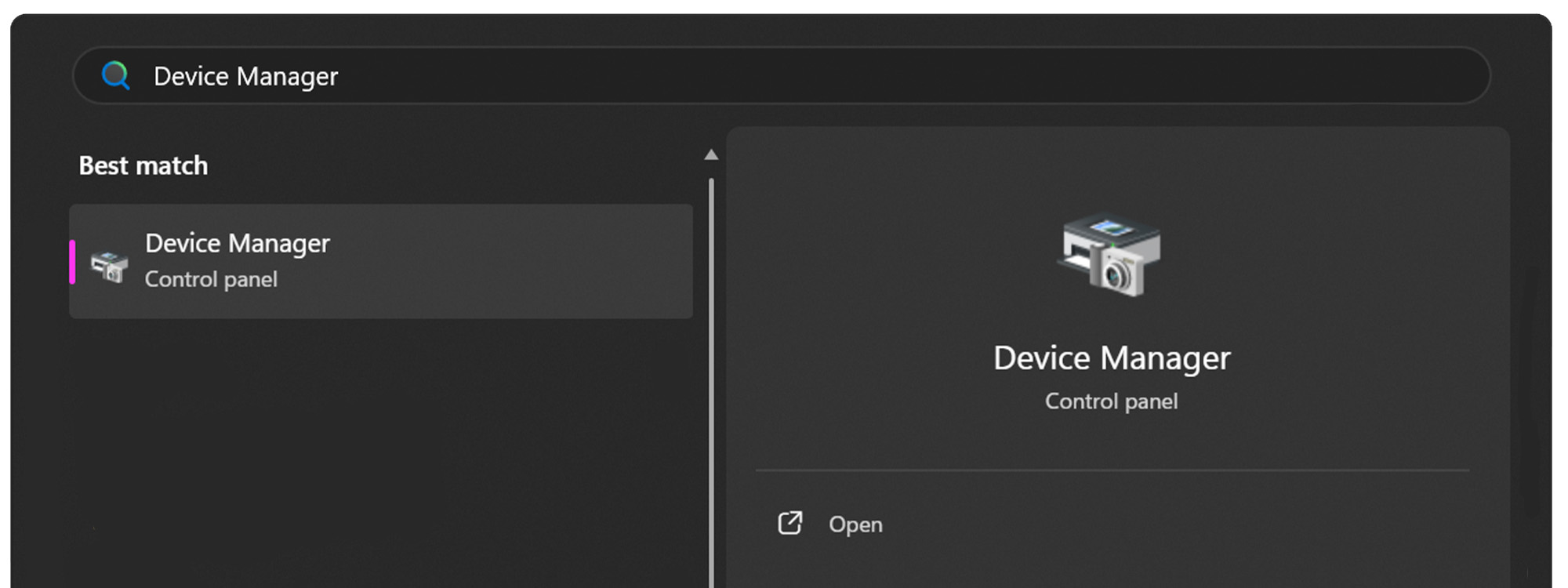
Open the Start Menu on your Windows PC.

Open the Device Manager.
Expand the Ports (COM & LPT) dropdown.
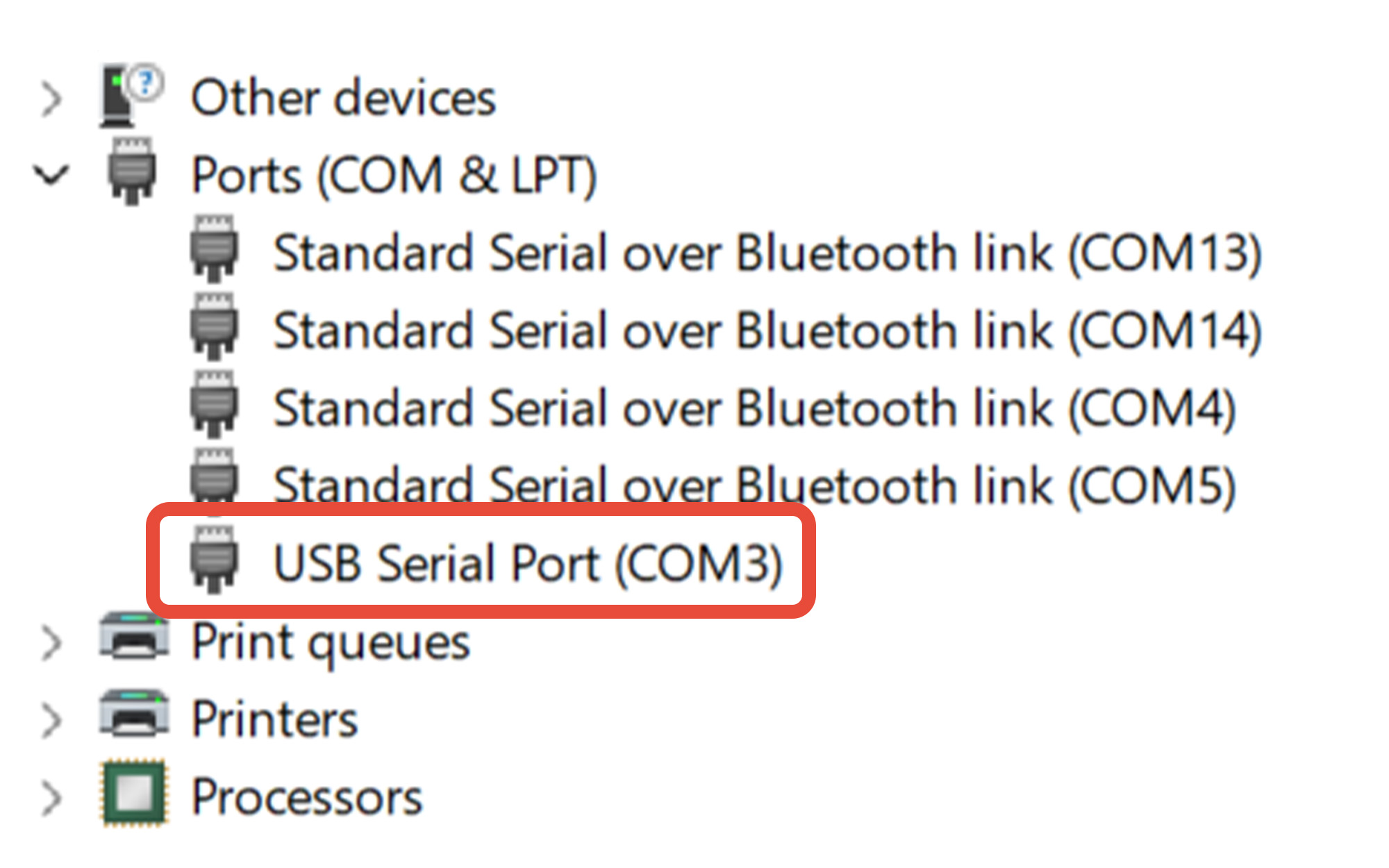
Determine the COM port assigned to the MX200. In this example, the MX200 is assigned to COM3.
If you're unsure which COM port belongs to the MX200:
- Leave Device Manager open.
- Disconnect the USB cable from the PC.
- Watch which COM port disappears from the Ports (COM & LPT) list.
- Reconnect the USB cable.
- The COM port that reappears is the port assigned to the MX200.
Remember this COM port number. You will select it when connecting to the MX200 using either the Online Serial Terminal or Tera Term.
4 Using The Fredericks Company Online Serial Terminal
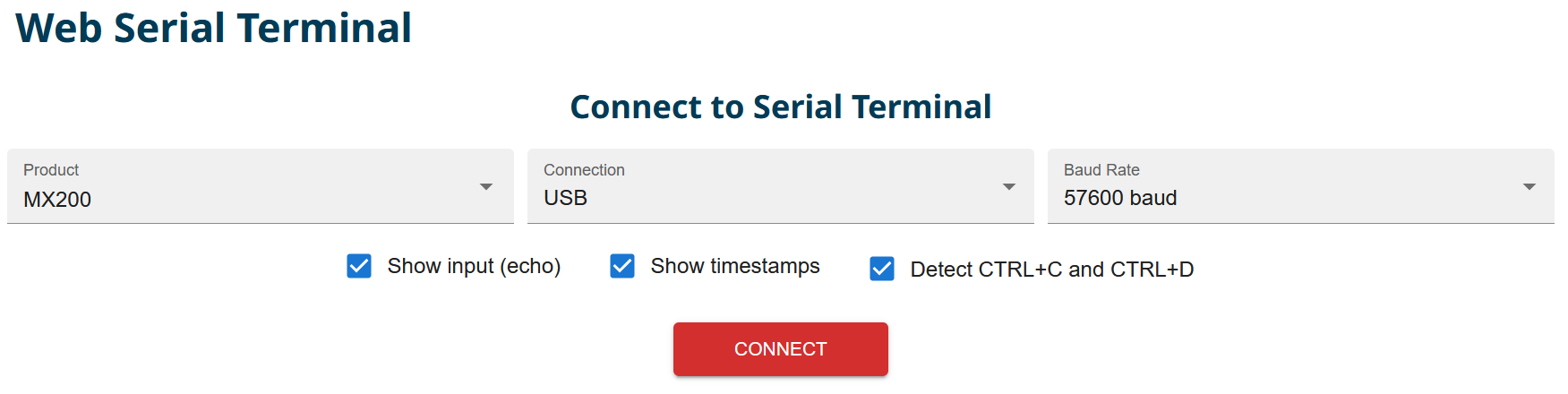
Using Google Chrome or Microsoft Edge, visit The Fredericks Company Online Serial Terminal.
Select MX200 from the Product dropdown and USB from the Connection dropdown. Select the baud rate configured on your MX200. In this example, 57600 baud is used.
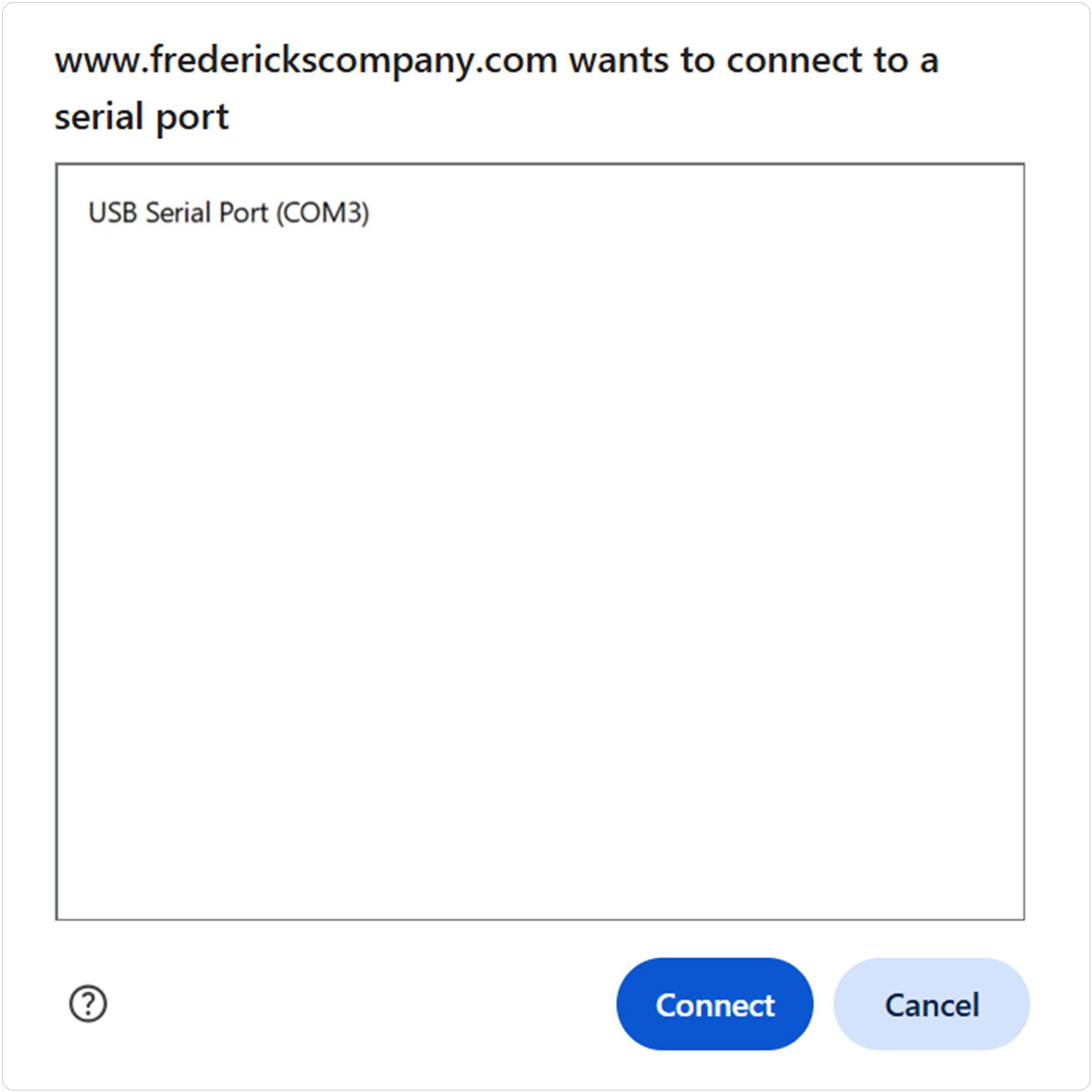
Click CONNECT to open the serial-port selection window.
Select the COM port assigned to your MX200, then click Connect.
If you are unsure which COM port to select, see Section 3, Finding the COM Port.
Use the terminal input field or the Command Assistant to send a test command to the MX200. For example, to read the vacuum measurement from channel one:
Send: S101
Continue using the Command Assistant to locate and send additional supported MX200 commands or enter commands manually in the terminal.
See Section 6, MX200 Communications Commands, for the available commands.
5 Using Tera Term
Open Tera Term on your Windows PC.
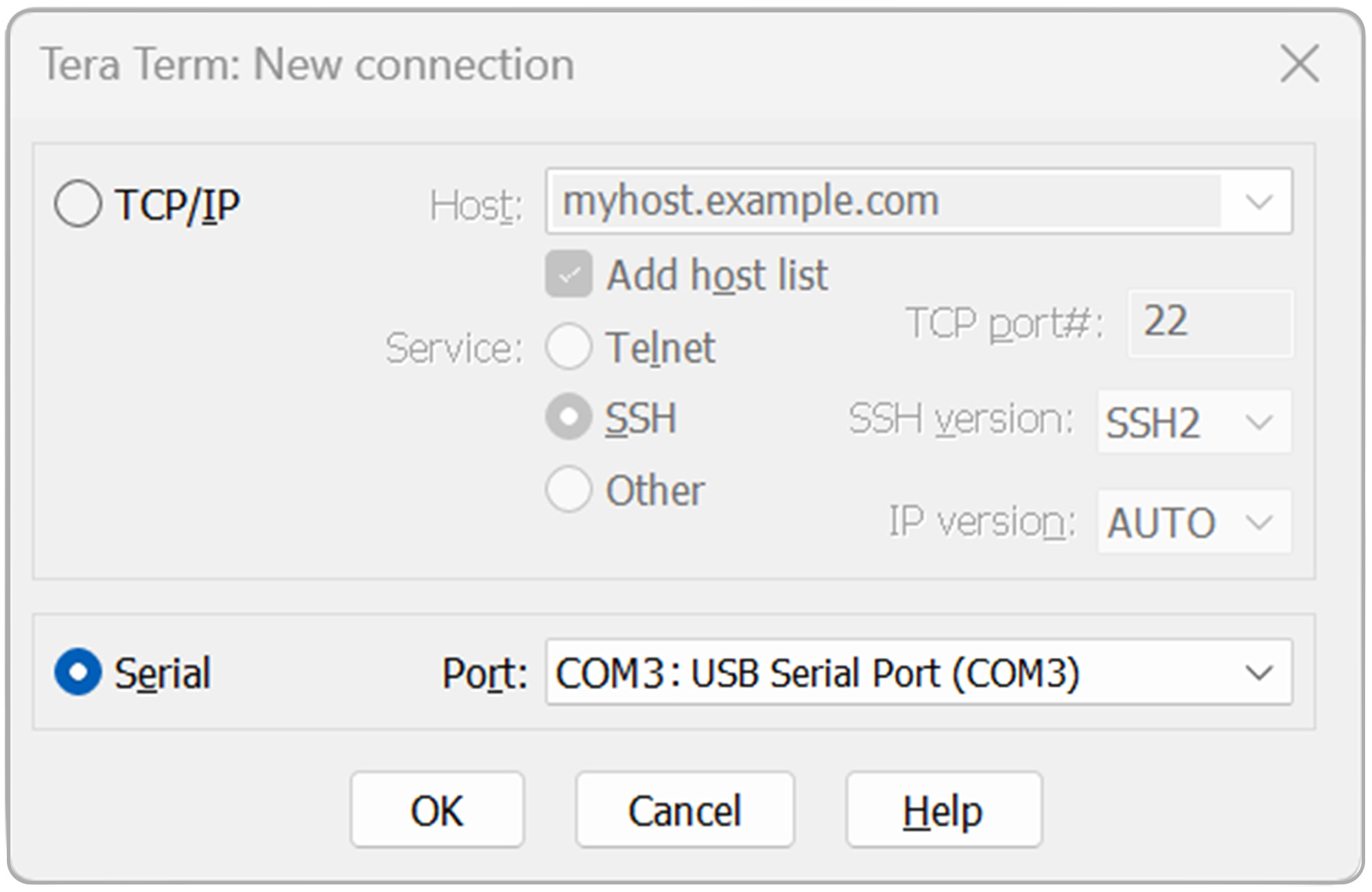
Select Serial, then select the COM port assigned to your MX200 from the Port dropdown.
Click OK to continue.
If you are unsure which COM port to select, see Section 3, Finding the COM Port.
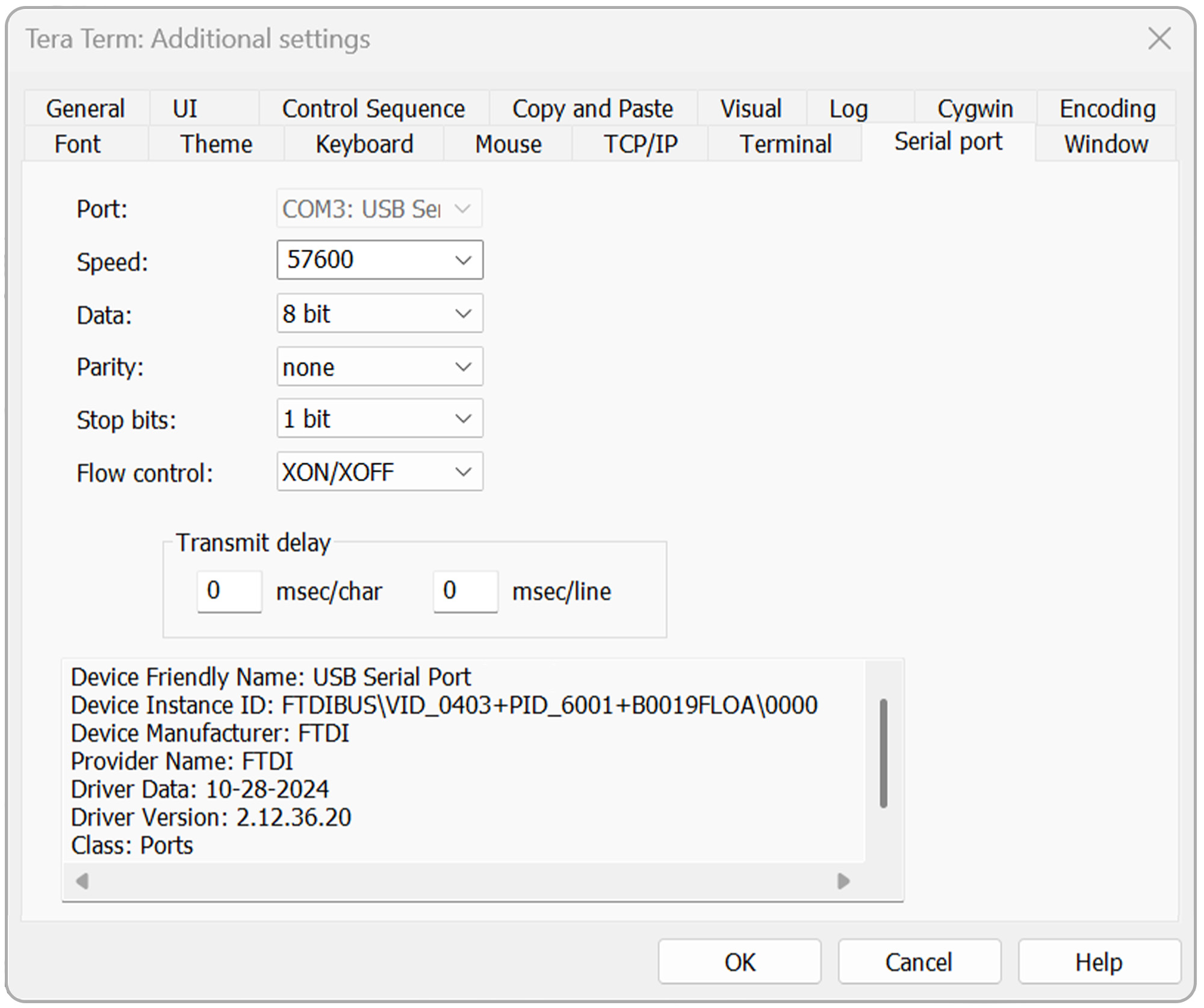
Open the Setup menu, then select Serial port.
Verify that the serial port settings are configured as follows:
- Baud rate: Baud rate configured on the MX200
- Data: 8 bit
- Parity: none
- Stop: 1 bit
- Flow control: Xon/Xoff
- Transmit delay: 0 msec/char, 0 msec/line
Click OK to continue.
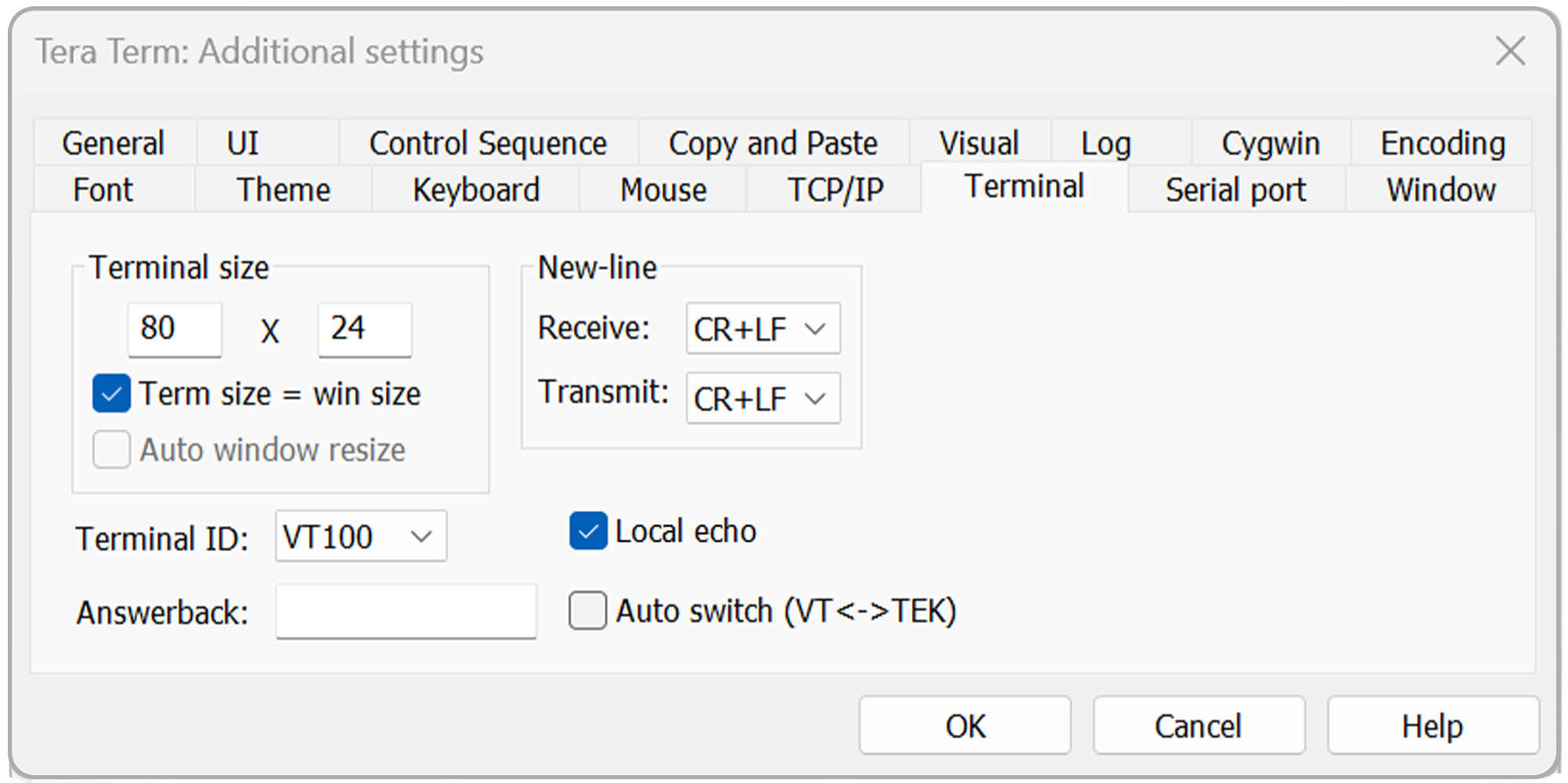
Open the Setup menu again, then select Terminal.
For standard communications, configure:
- Receive: CR+LF
- Transmit: CR+LF
- Local echo: Checked
For bootloading, use:
- Receive: CR
- Transmit: CR
- Local echo: Checked
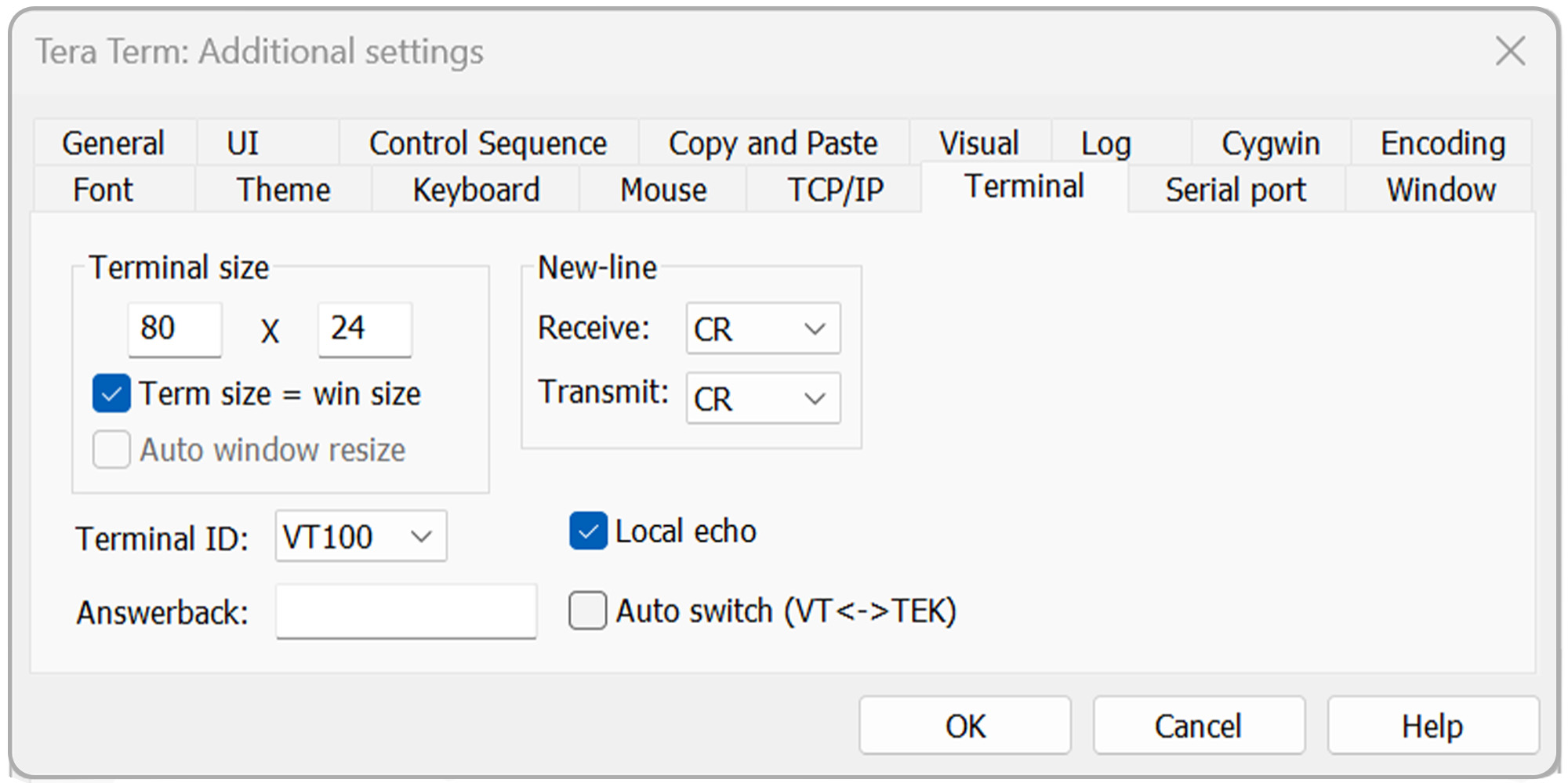
Click OK to continue.
To verify communications:
Send: S101
Press Enter.
The MX200 should return the vacuum measurement for channel 1.
Continue using Tera Term to send additional supported MX200 commands.
See Section 6, MX200 Communications Commands, for the available commands.
6 MX200 Communications Commands
Use the following table as a reference for communicating with the MX200.
When using The Fredericks Company Online Serial Terminal, supported commands can also be located and sent using the Command Assistant.
When using Tera Term, enter the desired command manually and press Enter.
For a detailed description of MX200 digital communications and individual commands, refer to Section 9, Digital Communications, of the MX200 Vacuum Controller Instruction Manual .
| 명령 | 샘플 출력 | 설명 |
|---|---|---|
| R1<cr> | XX<cr><lf> | 출력 단위 설정 XX: PA=파스칼, TR=토르, MB=mBar, TD=토르 소수점, MT=mTorr/Torr |
| W1XX<cr> | XX<cr><lf> | XX로 단위 설정: PA=파스칼, TR=토르, MB=mBar, TD=토르 소수점 |
| S1XX<cr> | ppsee<cr><lf> | 스테이션 XX용 진공 판독은 ppsee입니다. |
| S1<cr> | XX=ppsee … XX=ppsee<cr><lf> | 모든 채널 XX에 대한 출력 ppsee 판독값 |
| S2<cr> | NNNNNN<cr><lf> | 로직 펌웨어 버전 |
| S3<cr> | NNNNNN<cr><lf> | 펌웨어 버전 표시 |
| S4<cr> | XX=YY … XX=YY<cr><lf> | 출력 스테이션 유형: XX = 스테이션 번호, YY = 센서 유형 |
| S5<cr> | XX=YY … XX=YY<cr><lf> | 출력 세트 점 XX 상태 YY(ON=켜짐, OF=끄기, 00=설정 점 연결 없음) |
| S6<cr> | Televac … <cr><lf> | 모든 설정 정보 출력 |
| RC1XX<cr> | Baa<cr><lf> | 채널 XX의 출력 첫 번째 교정 지점 |
| RC2XX<cr> | Baa<cr><lf> | 채널 XX에 대한 출력 두 번째 교정 지점 |
| RC3XX<cr> | Baa<cr><lf> | 채널 XX에 대한 세 번째 보정 지점 출력, 포인트가 없는 경우 반환 오차 |
| RC4XX<cr> | Baa<cr><lf> | Output fourth calibration point for channel XX, return error if point doesn’t exist |
| WC1XXBaa<cr> | PPSEE<cr><lf> | 채널 XX에 대한 첫 번째 교정 지점 설정 |
| WC2XXBaa<cr> | PPSEE<cr><lf> | Set second calibration point for channel XX |
| WC3XXBaa<cr> | PPSEE<cr><lf> | 채널 XX에 대한 세 번째 교정 지점 설정, 포인트가 없는 경우 반환 오류 |
| WC4XXBaa<cr> | PPSEE<cr><lf> | Set fourth calibration point for channel XX, return error if point doesn’t exist |
| R2<cr> | 01 02 03 04 05 … <cr><lf> | MX200에 연결된 출력 채널 번호 |
| R3XX<cr> | HI<cr> or LO<cr><lf> | 스테이션 XX용 HI/LO 해상도 출력 |
| W3XX<cr> | HI<cr> or LO<cr><lf> | 스테이션 XX용 토글 HI/LO 해상도 |
| R4<cr> | 01 02 03 04 05 … <cr><lf> | 측정 화면에 표시하도록 설정된 출력 채널 번호 |
| W4XX<cr> | ON<cr> or OF<cr><lf> | 측정 화면에서 채널 XX를 추가하거나 제거합니다. |
| R5XX<cr> | FbaaBAA<cr><lf> | 출력 아날로그 출력 형식, 높고 낮은 값 |
| W5XXF<cr> | F<cr><lf> | 채널 XX 아날로그 출력 형식을 선형별 으로 설정합니다(lin/dec=3, lin/dec=4) |
| W5XX1baa<cr> | Fbaa<cr><lf> | 채널 XX 아날로그 출력 형식을 선형으로 설정: baa=높은 값 |
| W5XX2baaBAA<cr> | FbaaBAA<cr><lf> | 선형채널 XX 아날로그 출력 형식을 선형으로 설정: baa=높은 값, BAA=낮은 값 |
| R6XX<cr> | GG<cr><lf> | 채널 XX의 출력 가스 설정 |
| W6XXGG<cr> | GG<cr><lf> | 채널 XX를 가스 타입으로 GG로 설정 |
| R7Y<cr> | ppseePPSEEZZ<cr><lf> | 출력 릴레이 Y 온 = ppsee, 릴레이 Y 오프 = PPSEE, 채널 ZZ 릴레이 Y |
| W7YppseePPSEEZZ<cr> | ppseePPSEE<cr><lf> | 릴레이 Y를 PPSEE로 설정하고, Y를 PPSEE로 릴레이하고, Y를 채널 ZZ로 릴레이 |
| R8<cr> | A<cr><lf> | Outputs the cold cathode mode, A (auto = 1, self = 2) |
| W8A<cr> | A<cr><lf> | 차가운 음극 모드, A(자동 = 1, 자기 = 2) 설정 |
| R9<cr> | BB<cr><lf> | 차가운 음극 스위치 포인트 값, BB (01 ~ 50) 반환 |
| W9BB<cr> | BB<cr><lf> | 차가운 음극 스위치 포인트 값, BB(01 ~ 50) 설정 |
| R10<cr> | CD<cr><lf> | Returns the cold cathode status odd and even (on/off) C-odd, D-even (0 = off, 1 = on) |
| W10CD<cr> | CD<cr><lf> | Sets the cold cathode status odd and even (on/off) C-odd, D-even (0 = off, 1 = on) |
| C1TTTT<cr> | TTTT<cr><lf> | TTTT로 baud 속도 설정 |
| C2EE<cr> | EE<cr><lf> | 주소 설정 주소는 EE(00~99), RS-485 전용 |
| C4N<cr> | N<cr><lf> | I/O를 N으로 변경(RS-232=1, RS-485=2, USB=3) |
| C1<cr> | TTTT<cr><lf> | 출력 baud 속도 설정 |
| C2<cr> | EE<cr><lf> | RS-485의 출력 주소 |
| C4<cr> | N<cr><lf> | 출력 통신 유형(RS-232=1, RS-485=2, USB=3) |
| HM<cr> | M<cr><lf> | 측정 화면으로 돌아가기 |
| RLR<cr> | SXXX<cr> | mTorr에서 누출 속도 계산 또는 채널 1을 출력 (S = 기호, XXX =-999 ~ 999) |
| WLRX<cr> | X<cr><lf> | 채널 1의 누출 속도 계산 켜기 또는 끄기(0=끄기, 1=켜기) |
| WD_1XX<cr> | XX<cr><lf> | 채널 XX의 채널 설정 기본값 복원 |
| WD_7X<cr> | X<cr><lf> | 세트점 X에 대한 세트 포인트 릴레이 기본값 복원 |
| WD_CXX<cr> | XX<cr><lf> | 채널 XX의 교정 기본값 복원 |
| WD_G<cr> | D<cr><lf> | 전역 설정에 대한 기본값 복원 |
| SN<cr> | NNNNNN<cr><lf> | 000000에서 999999까지의 값으로 장치의 6자리 일련 번호를 반환합니다. |
| PG_LGC<cr> | Bootloader … <cr><lf> | 로직 펌웨어의 부트 로더 입력 |
| PG_DSP<cr> | Bootloader … <cr><lf> | Enter the bootloader for the display firmware |