



1 Overview
The Televac® MX Series provides a modern replacement for legacy MP Series active vacuum gauges. This application note explains the differences in analog outputs, wiring, calibration, display, and set points that should be considered when replacing an MP2AR or MP4AR with an MX2A or MX4A.
Back to Table of Contents2 MP and MX Series Comparison
The table below summarizes the primary differences between the MX2A, MX4A, MP2AR, and MP4AR.
| 特徴 | エムエックスツーエー | エムエックスフォーエー | MP2AR | エムピーエヌピーエーアール |
|---|---|---|---|---|
| 範囲 | 1000 Torrへの1*10-4 | 1000 Torrへの1*10-4 | 1*10-3から 20 Torr | 1*10-3 to 1000 Torr |
| オリエンテーション |
Any Vertical |
垂直方向 | 何れかの | 垂直方向 |
| アナログ出力 | 選択可能な7つのユーザー | 選択可能な7つのユーザー | 2工場セット | 3つの工場セット |
| コミュニケーション | RS-485 | RS-485 | なし | なし |
| 応答時間 | < 2 seconds | < 1 second | < 2 seconds | < 1 second |
3 Analog Output Compatibility
MP Series gauges provide fewer analog output options than MX Series gauges. The available output modes are summarized below.
| Series | Available Analog Outputs |
|---|---|
| MP Series | Log, Linear, Non-linear |
| MX Series | Log, Linear 1, Linear 2, Linear 3, Linear 4, Linear by decade, Non-linear |
MP2AR and MX2A Analog Output Comparison
| MP2AR出力 | MX2A相当出力 |
|---|---|
| リニア | リニア4 |
| 非線形 | No direct equivalent |
MP4AR and MX4A Analog Output Comparison
| MP4AR出力 | MX4A相当出力 |
|---|---|
| ログ | ログ |
| リニア | リニア4 |
| 非線形 | 非線形 |
On MP Series gauges, analog output behavior is selected using jumpers and connector pin selection. On MX Series gauges, the analog output can be configured from the front panel or through RS-485 communications.
To configure an MX gauge to match the linear output of an MP gauge, select Linear 4 using the following steps:
- Navigate to the Measurement Screen.
- Press SEL four times. The screen will read Analog Out.
- Press ENT to unlock the screen.
- Press DOWN three times. The screen will read Linear 4.
- Press ENT to save the change.
4 Wiring and Pin Connections
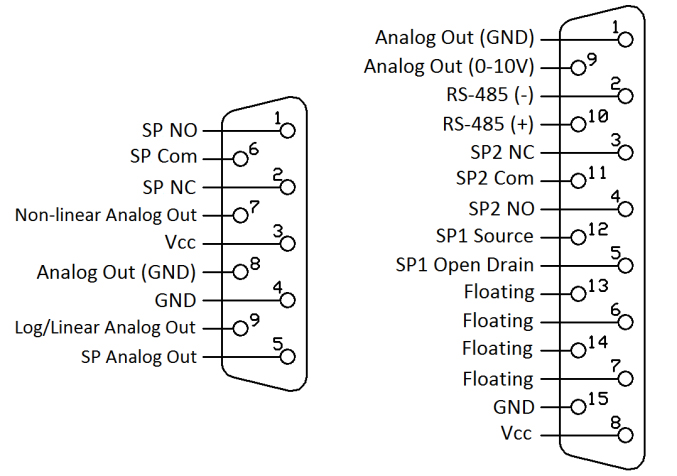
The MP and MX Series use different connectors and pin assignments. Existing MP wiring must therefore be updated when installing an MX replacement.
Connector Comparison
| MPコネクタ | MXコネクタ |
|---|---|
| 9-pin D-sub | 15-pin D-sub |
Pin Mapping
| 接続 | MPピン | MX Pin |
|---|---|---|
| パワー(+) | ピン3 | ピン8 |
| パワー(-) | ピン4 | ピン15 |
| ログ/リニアアナログ出力(+) | ピン5 | ピン9 |
| 非線形アナログ出力(+) | ピン7 | ピン9 |
| アナログ出力(-) | ピン8 | ピン1 |
| セットポイントリレーNO | ピン1 | ピン4 |
| セットポイントリレーNC | ピン2 | ピン3 |
| セットポイントリレーC | ピン6 | ピン11 |
Overall Pin Diagram Comparison
5 Calibration
Calibration points on MP Series gauges are adjusted using potentiometers (pots). MX Series calibration is performed through the front panel or RS-485 communications.
MP2ARとMX2Aのキャリブレーションポイント
| 校正ポイント | MP2AR | エムエックスツーエー |
|---|---|---|
| ゼロ | 噫 | 噫 |
| 10 トール | 否 | 噫 |
| 760 Torr (大気) | 否 | 噫 |
MP4ARとMX4Aのキャリブレーションポイント
| 校正ポイント | エムピーエヌピーエーアール | エムエックスフォーエー |
|---|---|---|
| ゼロ | 噫 | 噫 |
| 1 トール | 否 | 噫 |
| 760 Torr (大気) | 噫 | 噫 |
The additional calibration points available on MX Series gauges allow calibration to be performed at more points across the measurement range.
Back to Table of Contents6 Display
MX Series gauges use a higher-resolution front-facing OLED display, while MP Series gauges use a top-mounted 3-character LED display.
| 説明 | MP表示 | MXディスプレイ |
|---|---|---|
| タイプ | 3-character 7-segment LED | 256 × 64 color OLED |
| 場所 | トップ | フロント |
| 読み取り可能距離 | 三尺 | 三尺 |
The MX display also provides access to configuration settings directly from the front panel.
Back to Table of Contents7 Set Points
MX Series gauges provide two set points and support higher switching loads than MP Series gauges.
| 説明 | MP | エムエックス |
|---|---|---|
| セットポイント | 1 | 2 |
| タイプ | リレー | リレー、オープンコレクタ |
| リレー接点定格 | 0.5 A @ 24 V DC | 2 A @ 220 V DC (250 V AC) |
| オープン コレクター評価 | なし | 2 A @ 60 V DC |
8 RS-485 Communications
MX Series gauges include RS-485 communications, while MP Series gauges do not. RS-485 allows multiple addressable gauges to share the same communications bus and enables remote configuration without accessing the gauge's front panel.
Back to Table of Contents