



1 Description
This application note explains the process for interfacing and communicating with an MX200 Vacuum Controller from a Windows PC.
The recommended method is to use The Fredericks Company Online Serial Terminal. The Online Serial Terminal communicates directly with the MX200 through a supported web browser and allows MX200 serial commands to be sent without installing additional communications software.
USB communication is recommended when connecting the MX200 directly to a Windows PC.
Alternatively, you can use the Tera Term serial communications program. Tera Term must be installed on your computer before following these instructions. If you do not have Tera Term installed, download the latest version from GitHub .
Back to Table of Contents2 Required Equipment, Tools, and Software
| Equipment/Tool | Part Number/Requirement |
|---|---|
| Controllore di vuoto MX200 | 2-7900-034, 2-7900-037, or 2-7900-038 |
| USB Cable | USB Type A to USB Type B cable |
| Windows PC | PC with an available USB port |
| Google Chrome or Microsoft Edge | Online Serial Terminal method |
| Tera Term | Manual method only |
3 Finding the COM Port
On the MX200, press the Home button and navigate to:
Global Setup → Communications → Interface
Verify that USB is selected.
Then, navigate to:
Global Setup → Communications → Settings
Remember the baud rate. You will select it when connecting to the MX200 using either the Online Serial Terminal or Tera Term.
Connect the MX200 to your Windows PC using a USB Type A to USB Type B cable.
Connect the USB Type B connector to the USB port on the back of the MX200 and the USB Type A connector to an available USB port on your Windows PC.
Windows will automatically recognize the MX200 and assign it to a COM Port.
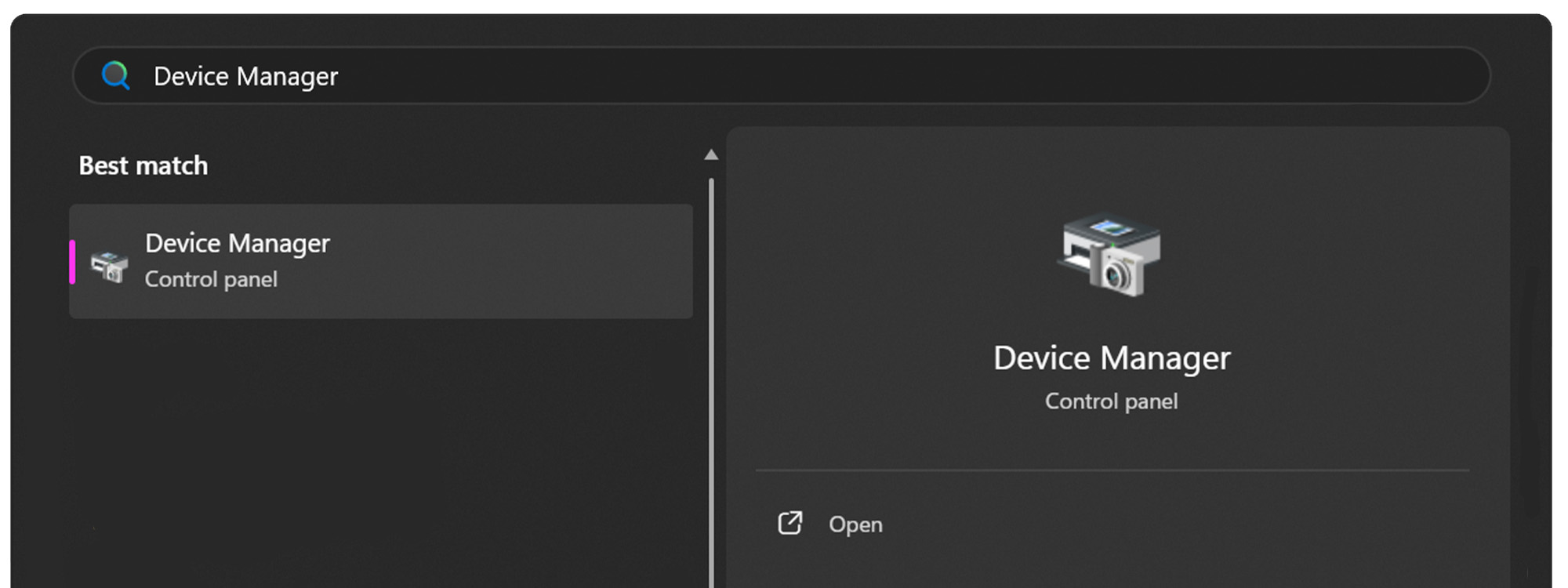
Open the Start Menu on your Windows PC.

Open the Device Manager.
Expand the Ports (COM & LPT) dropdown.
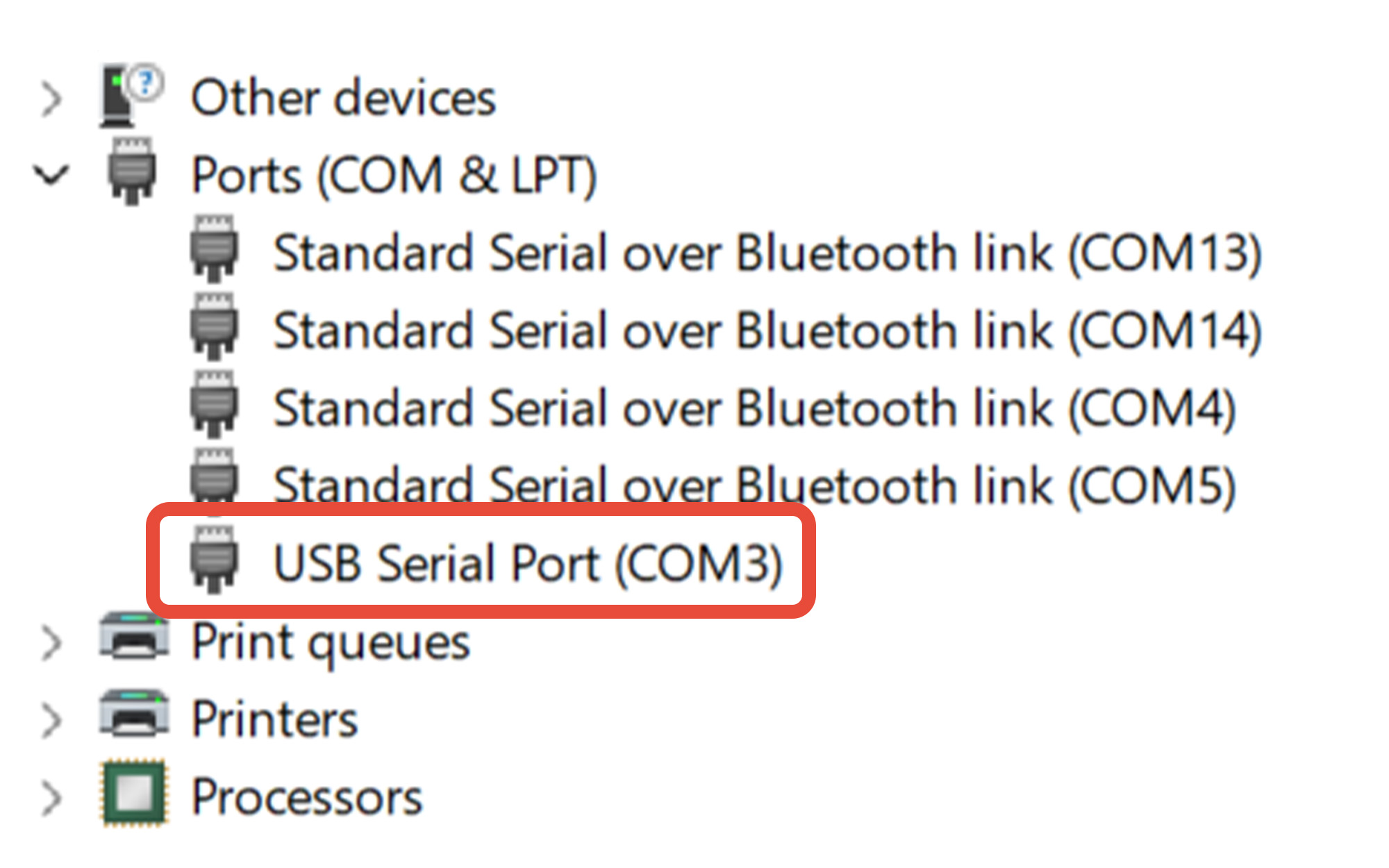
Determine the COM port assigned to the MX200. In this example, the MX200 is assigned to COM3.
If you're unsure which COM port belongs to the MX200:
- Leave Device Manager open.
- Disconnect the USB cable from the PC.
- Watch which COM port disappears from the Ports (COM & LPT) list.
- Reconnect the USB cable.
- The COM port that reappears is the port assigned to the MX200.
Remember this COM port number. You will select it when connecting to the MX200 using either the Online Serial Terminal or Tera Term.
4 Using The Fredericks Company Online Serial Terminal
Using Google Chrome or Microsoft Edge, visit The Fredericks Company Online Serial Terminal.
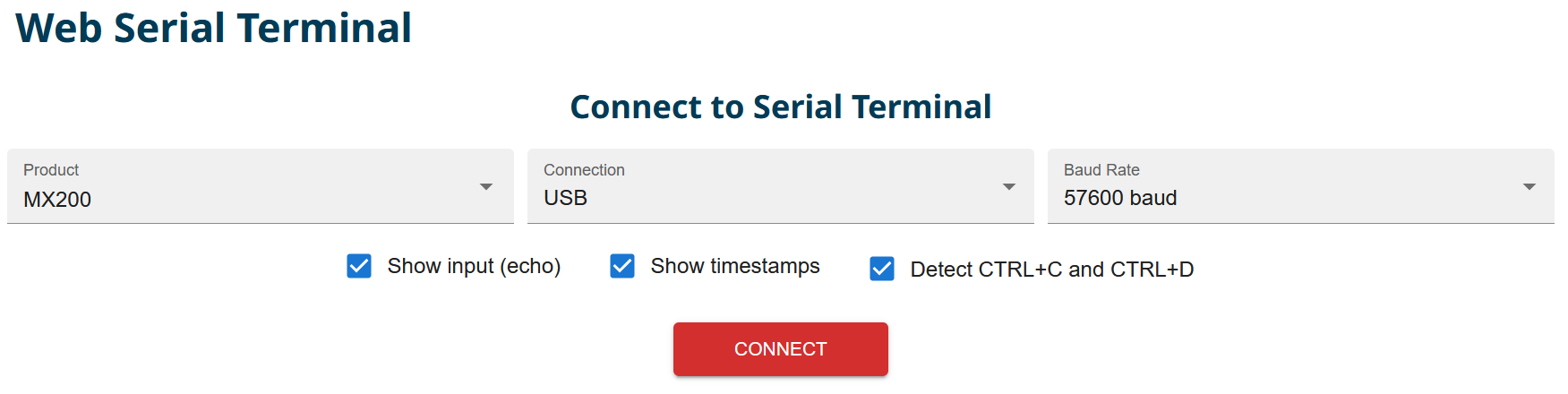
Select MX200 from the Product dropdown and USB from the Connection dropdown. Select the baud rate configured on your MX200. In this example, 57600 baud is used.
Click CONNECT to open the serial-port selection window.
Select the COM port assigned to your MX200, then click Connect.
If you are unsure which COM port to select, see Section 3, Finding the COM Port.
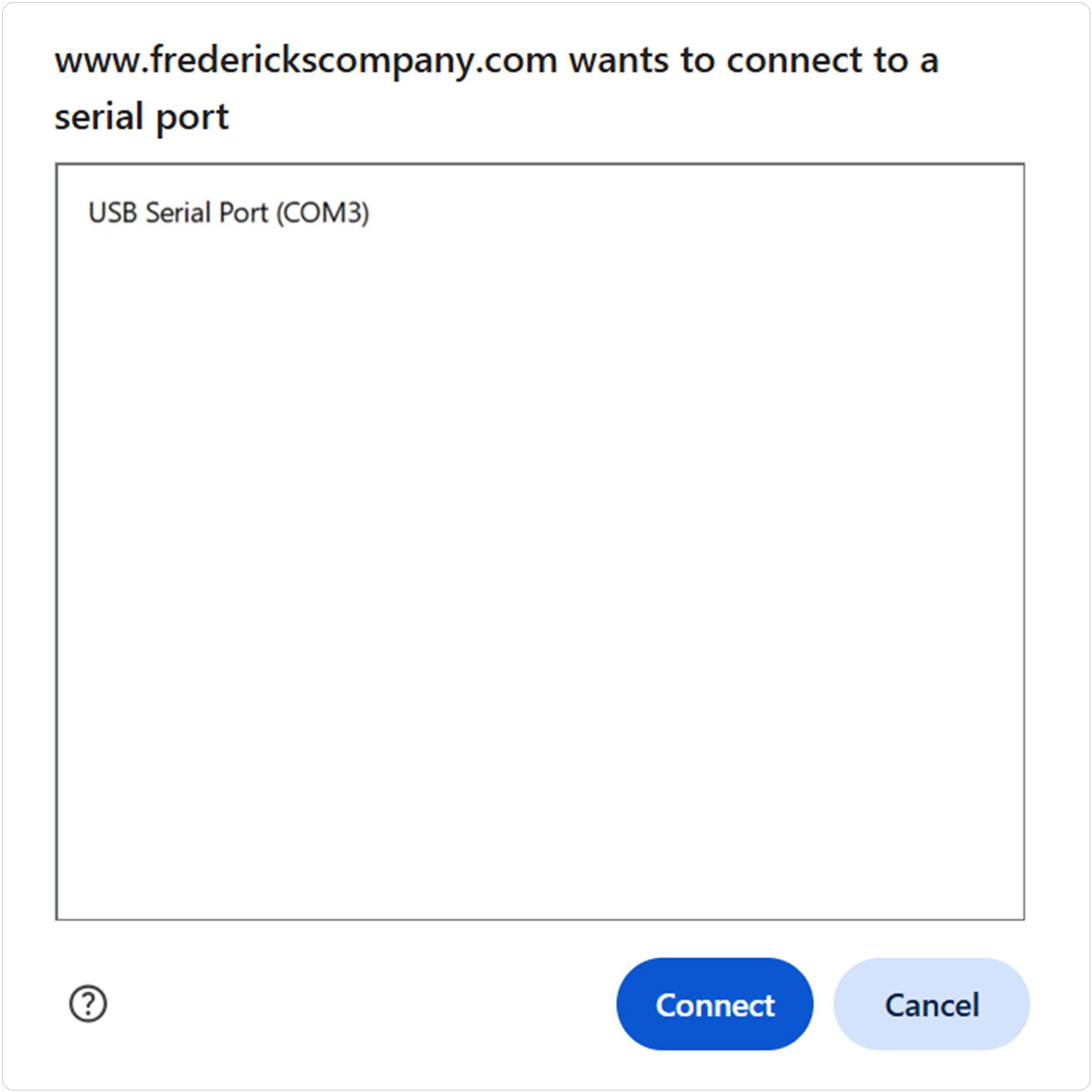
Use the terminal input field or the Command Assistant to send a test command to the MX200. For example, to read the vacuum measurement from channel one:
Send: S101
Continue using the Command Assistant to locate and send additional supported MX200 commands or enter commands manually in the terminal.
See Section 6, MX200 Communications Commands, for the available commands.
5 Using Tera Term
Open Tera Term on your Windows PC.
Select Serial, then select the COM port assigned to your MX200 from the Port dropdown.
Click OK to continue.
If you are unsure which COM port to select, see Section 3, Finding the COM Port.
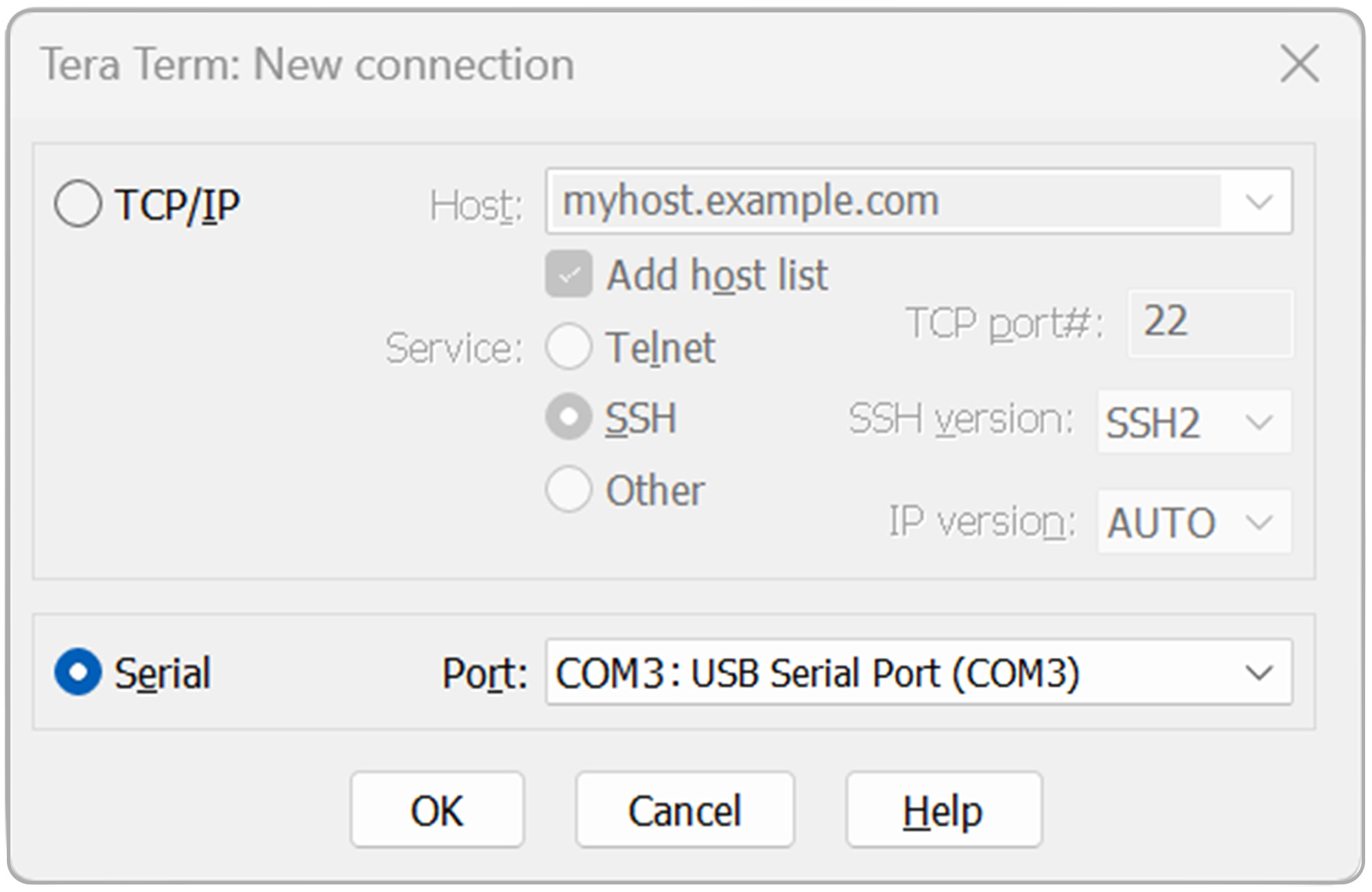
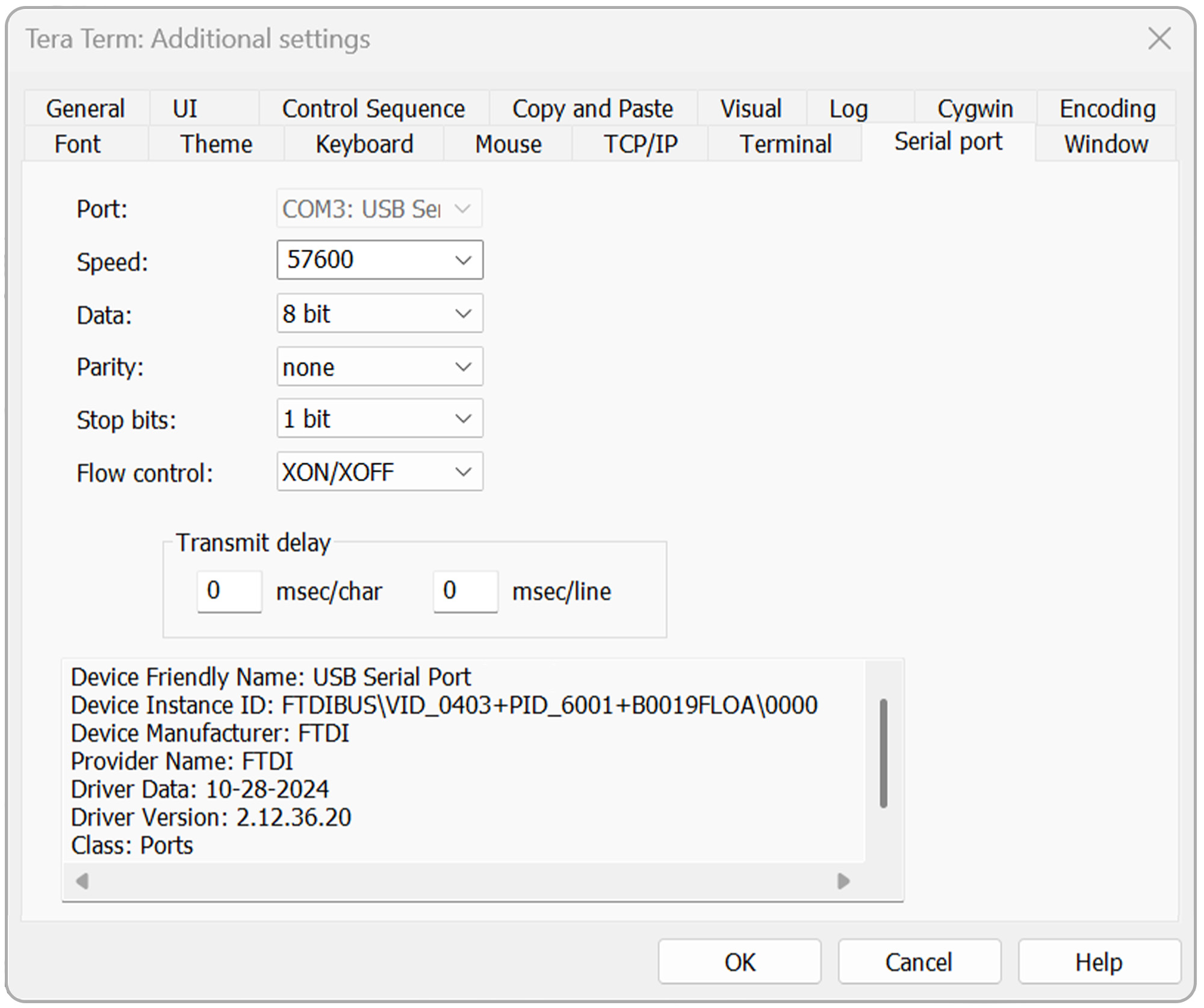
Open the Setup menu, then select Serial port.
Verify that the serial port settings are configured as follows:
- Baud rate: Baud rate configured on the MX200
- Data: 8 bit
- Parity: none
- Stop: 1 bit
- Flow control: Xon/Xoff
- Transmit delay: 0 msec/char, 0 msec/line
Click OK to continue.
Open the Setup menu again, then select Terminal.
For standard communications, configure:
- Receive: CR+LF
- Transmit: CR+LF
- Local echo: Checked
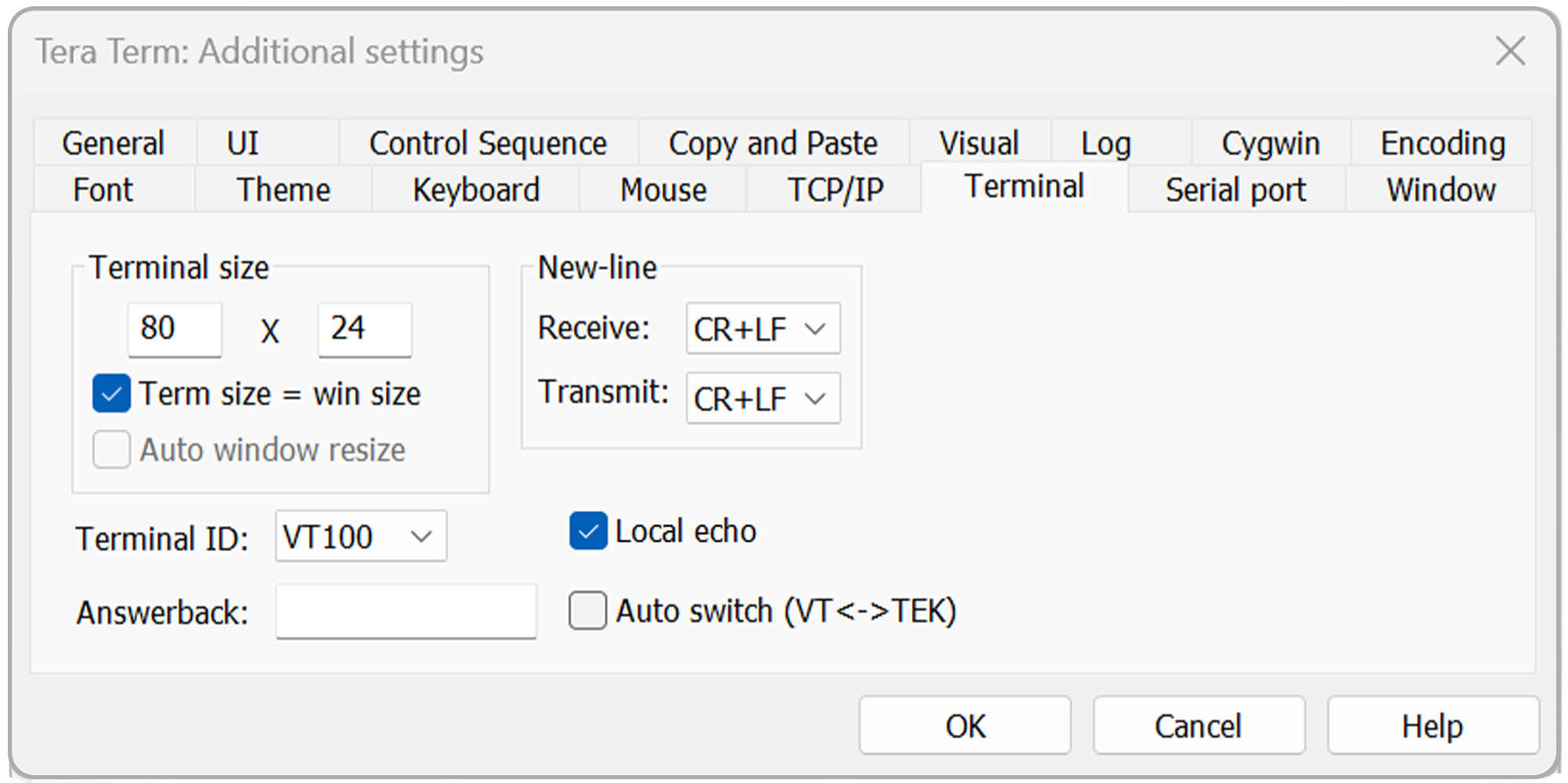
For bootloading, use:
- Receive: CR
- Transmit: CR
- Local echo: Checked
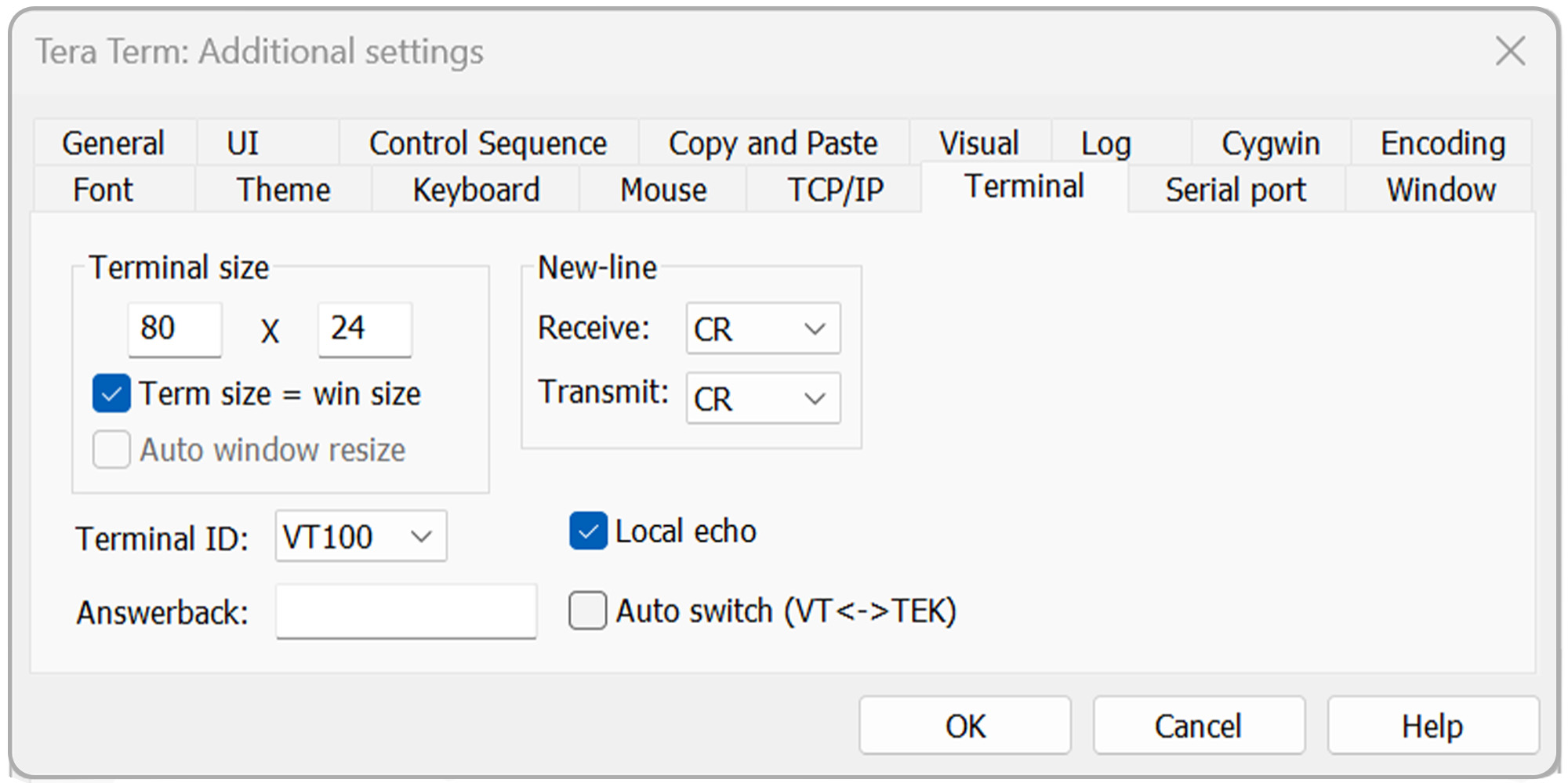
Click OK to continue.
To verify communications:
Send: S101
Press Enter.
The MX200 should return the vacuum measurement for channel 1.
Continue using Tera Term to send additional supported MX200 commands.
See Section 6, MX200 Communications Commands, for the available commands.
6 MX200 Communications Commands
Use the following table as a reference for communicating with the MX200.
When using The Fredericks Company Online Serial Terminal, supported commands can also be located and sent using the Command Assistant.
When using Tera Term, enter the desired command manually and press Enter.
For a detailed description of MX200 digital communications and individual commands, refer to Section 9, Digital Communications, of the MX200 Vacuum Controller Instruction Manual .
| Comando | Uscita del campione | Descrizione |
|---|---|---|
| R1<cr> | XX<cr><lf> | Impostazione unità di uscita XX: PA=Pascal, TR=Torr, MB=mBar, TD=Torr decimale, MT=mTorr/Torr |
| W1XX<cr> | XX<cr><lf> | Impostare le unità di misura su XX: PA=Pascal, TR=Torr, MB=mBar, TD=Torr decimale |
| S1XX<cr> | ppsee<cr><lf> | La lettura a vuoto per la stazione XX è ppsee |
| S1<cr> | XX=ppsee … XX=ppsee<cr><lf> | Uscita ppvedere le letture per ogni canale XX |
| S2<cr> | NNNNNN<cr><lf> | Versione del firmware logico |
| S3<cr> | NNNNNN<cr><lf> | Visualizzare la versione del firmware |
| S4<cr> | XX=YY … XX=YY<cr><lf> | Tipi di stazioni di uscita: XX = numero di stazione, YY = tipo di sensore |
| S5<cr> | XX=YY … XX=YY<cr><lf> | Uscita set point XX stato YY (ON=on, OF=off, 00=nessun set point collegato) |
| S6<cr> | Televac … <cr><lf> | Visualizza tutte le informazioni di configurazione |
| RC1XX<cr> | Baa<cr><lf> | Uscita primo punto di taratura per il canale XX |
| RC2XX<cr> | Baa<cr><lf> | Secondo punto di taratura dell'uscita per il canale XX |
| RC3XX<cr> | Baa<cr><lf> | Uscita terzo punto di calibrazione per il canale XX, errore di ritorno se il punto non esiste |
| RC4XX<cr> | Baa<cr><lf> | Output fourth calibration point for channel XX, return error if point doesn’t exist |
| WC1XXBaa<cr> | PPSEE<cr><lf> | Impostare il primo punto di taratura per il canale XX |
| WC2XXBaa<cr> | PPSEE<cr><lf> | Set second calibration point for channel XX |
| WC3XXBaa<cr> | PPSEE<cr><lf> | Impostare il terzo punto di taratura per il canale XX, errore di ritorno se il punto non esiste |
| WC4XXBaa<cr> | PPSEE<cr><lf> | Set fourth calibration point for channel XX, return error if point doesn’t exist |
| R2<cr> | 01 02 03 04 05 … <cr><lf> | Numeri dei canali di uscita collegati all'MX200 |
| R3XX<cr> | HI<cr> or LO<cr><lf> | Uscite con risoluzione HI/LO per la stazione XX |
| W3XX<cr> | HI<cr> or LO<cr><lf> | Attivare la risoluzione HI/LO per la stazione XX |
| R4<cr> | 01 02 03 04 05 … <cr><lf> | Numeri dei canali di uscita impostati per la visualizzazione sullo schermo di misura |
| W4XX<cr> | ON<cr> or OF<cr><lf> | Aggiunge o rimuove il canale XX dalla schermata di misura |
| R5XX<cr> | FbaaBAA<cr><lf> | Formato di uscita analogica in uscita, valori alti e bassi |
| W5XXF<cr> | F<cr><lf> | Impostare il formato di uscita analogica del canale XX su lineare per decennio (lin/dec=3, lin/dec 7E=4) |
| W5XX1baa<cr> | Fbaa<cr><lf> | Impostare il formato di uscita analogica del canale XX su lineare: baa=alto valore |
| W5XX2baaBAA<cr> | FbaaBAA<cr><lf> | Impostare il formato di uscita analogica del canale XX su lineare: baa=valore alto, BAA=valore basso |
| R6XX<cr> | GG<cr><lf> | Impostazione gas in uscita per il canale XX |
| W6XXGG<cr> | GG<cr><lf> | Impostare il canale XX sul tipo di gas su GG |
| R7Y<cr> | ppseePPSEEZZ<cr><lf> | Relè di uscita Y on = ppsee, relè Y off = PPSEE, e canale ZZ assegnato al relè Y |
| W7YppseePPSEEZZ<cr> | ppseePPSEE<cr><lf> | Impostare il relè Y su ppsee, il relè Y su PPSEE e il relè Y sul canale ZZ |
| R8<cr> | A<cr><lf> | Outputs the cold cathode mode, A (auto = 1, self = 2) |
| W8A<cr> | A<cr><lf> | Imposta il modo catodo freddo, A (auto = 1, auto = 2) |
| R9<cr> | BB<cr><lf> | Restituisce il valore del punto di commutazione del catodo freddo, BB (da 01 a 50) |
| W9BB<cr> | BB<cr><lf> | Imposta il valore del punto di commutazione del catodo freddo, BB (da 01 a 50) |
| R10<cr> | CD<cr><lf> | Returns the cold cathode status odd and even (on/off) C-odd, D-even (0 = off, 1 = on) |
| W10CD<cr> | CD<cr><lf> | Sets the cold cathode status odd and even (on/off) C-odd, D-even (0 = off, 1 = on) |
| C1TTTT<cr> | TTTT<cr><lf> | Impostare il baud rate su TTTT |
| C2EE<cr> | EE<cr><lf> | Impostare l'indirizzo su EE (da 00 a 99), solo RS-485 |
| C4N<cr> | N<cr><lf> | Cambiare I/O in N (RS-232=1, RS-485=2, USB=3) |
| C1<cr> | TTTT<cr><lf> | Impostazione del baud rate di uscita |
| C2<cr> | EE<cr><lf> | Indirizzo di uscita per RS-485 |
| C4<cr> | N<cr><lf> | Tipo di comunicazione in uscita (RS-232=1, RS-485=2, USB=3) |
| HM<cr> | M<cr><lf> | Ritorno alla schermata di misura |
| RLR<cr> | SXXX<cr> | Uscita il calcolo del tasso di perdita o canale 1 in mTorr (S=segno, XXX=-999 a 999) |
| WLRX<cr> | X<cr><lf> | Attivare o disattivare il calcolo del tasso di perdita per il canale 1 (0=off, 1=on) |
| WD_1XX<cr> | XX<cr><lf> | Ripristinare le impostazioni predefinite del canale XX |
| WD_7X<cr> | X<cr><lf> | Ripristinare le impostazioni predefinite del relè del set point per il set point X |
| WD_CXX<cr> | XX<cr><lf> | Ripristinare i valori predefiniti di taratura per il canale XX |
| WD_G<cr> | D<cr><lf> | Ripristinare i valori predefiniti per la configurazione globale |
| SN<cr> | NNNNNN<cr><lf> | Restituisce il numero di serie a sei cifre dell'unità, con valori da 000000 a 999999 |
| PG_LGC<cr> | Bootloader … <cr><lf> | Inserisce il bootloader per il firmware logico |
| PG_DSP<cr> | Bootloader … <cr><lf> | Enter the bootloader for the display firmware |